Section
Can contain only rows
Row
Contains at least one column
Column
Row
Can have to 8 columns
Column 1
Column 2
1
2
3
4
5
6
7
8
Columns contain modules
Module
Module
Section >
Row > Columns >
Modules
Module
Module
Module
Module

Your content here.
Your content goes here. Edit or remove this text inline or in the module Content settings. You can also style every aspect of this content in the module Design settings and even apply custom CSS to this text in the module Advanced settings.
Your content here.
Your content goes here. Edit or remove this text inline or in the module Content settings. You can also style every aspect of this content in the module Design settings and even apply custom CSS to this text in the module Advanced settings.
Your content here.
Your content goes here. Edit or remove this text inline or in the module Content settings. You can also style every aspect of this content in the module Design settings and even apply custom CSS to this text in the module Advanced settings.
Module
Module
Module
Module

Your content here.
Your content goes here. Edit or remove this text inline or in the module Content settings. You can also style every aspect of this content in the module Design settings and even apply custom CSS to this text in the module Advanced settings.
Your content here.
Your content goes here. Edit or remove this text inline or in the module Content settings. You can also style every aspect of this content in the module Design settings and even apply custom CSS to this text in the module Advanced settings.
Your content here.
Your content goes here. Edit or remove this text inline or in the module Content settings. You can also style every aspect of this content in the module Design settings and even apply custom CSS to this text in the module Advanced settings.
Module
Module
Module
Module
Module
Module
Module
Module
Module
Module
Your content goes here.
Edit or remove this text inline or in the module Content settings. You can also style every aspect of this content in the module Design settings and even apply custom CSS to this text in the module Advanced settings.



Your content goes here.
Edit or remove this text inline or in the module Content settings. You can also style every aspect of this content in the module Design settings and even apply custom CSS to this text in the module Advanced settings.
The sizing settings 1
Settings > design > sizing
Section and module width:
100% width by default.
Row width:
80% and max. website content width by default.
Appearance > customiser > general settings > layout settings > website content width
Setting sizing 'width' or 'height' in pixels can effect responsiveness, try using 'max width' or 'max height' instead.
Row width = 80%
Row width = 100%, max width = 100%
Row max width = 800px
The spacing settings
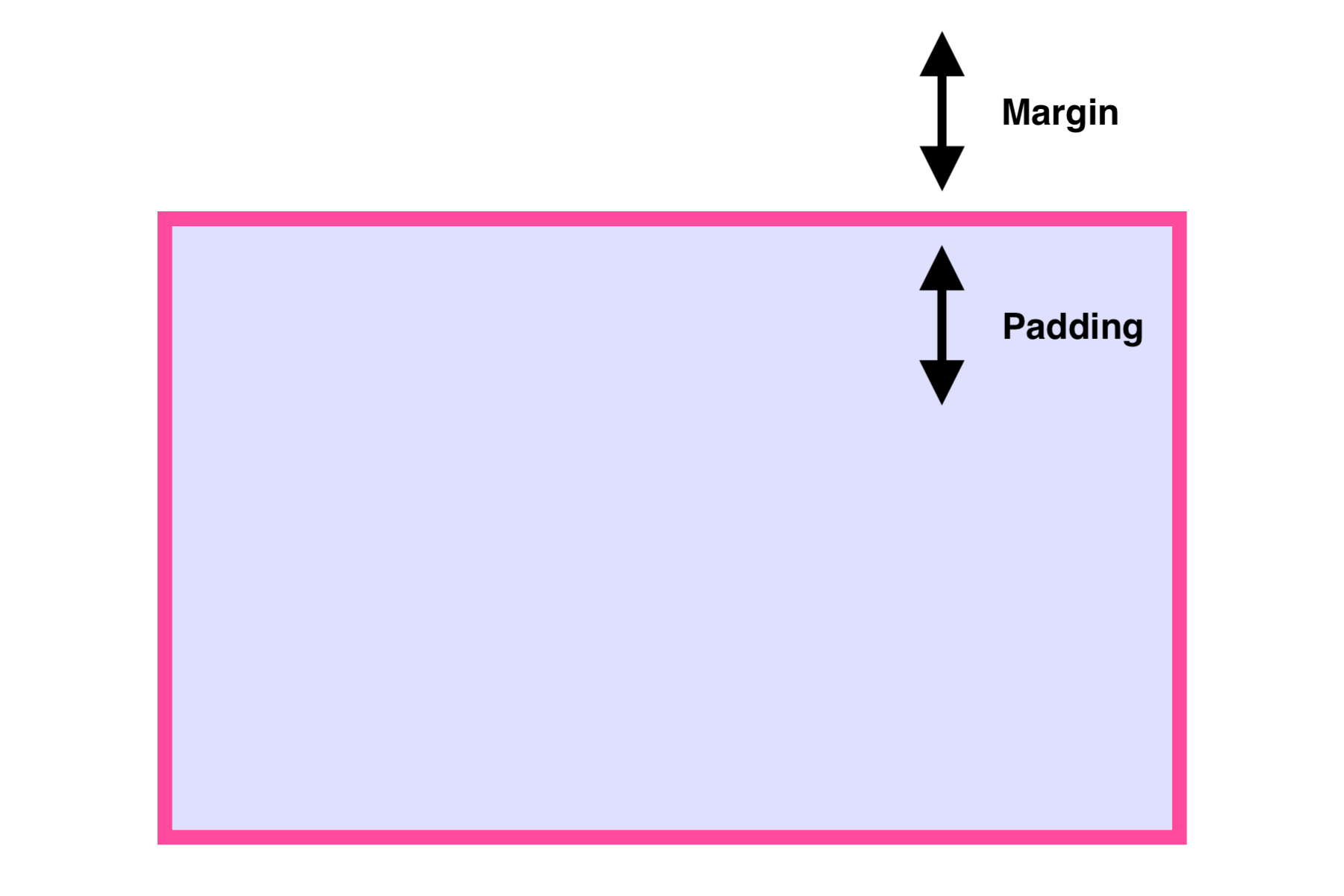
Margin > space outside element border
Padding > space inside element border


Margins overlap
Top and bottom margin on module
Top and bottom margin on module
Paddings add up
Top and bottom padding on module
Top and bottom padding on module
Sometimes we use negative margin to move outside a box.
Sections and rows have default top and bottom padding
Most modules have default bottom padding
On the last module in a row default padding is automatically removed
Examples of margins and padding
Without margins or padding
Edit or remove this text inline or in the module Content settings. You can also style every aspect of this content in the module Design settings and even apply custom CSS to this text in the module Advanced settings.
Without margins or padding
Edit or remove this text inline or in the module Content settings. You can also style every aspect of this content in the module Design settings and even apply custom CSS to this text in the module Advanced settings.
With margins on module
Edit or remove this text inline or in the module Content settings. You can also style every aspect of this content in the module Design settings and even apply custom CSS to this text in the module Advanced settings.
With margins on module
Edit or remove this text inline or in the module Content settings. You can also style every aspect of this content in the module Design settings and even apply custom CSS to this text in the module Advanced settings.
With padding on column
Edit or remove this text inline or in the module Content settings. You can also style every aspect of this content in the module Design settings and even apply custom CSS to this text in the module Advanced settings.
With padding on column
Edit or remove this text inline or in the module Content settings. You can also style every aspect of this content in the module Design settings and even apply custom CSS to this text in the module Advanced settings.
Topics in
Demo D4 page
- basic structure and identifying elements: sections, row, columns
- specialty section
- fullwidth
- global elements
- settings tab, move, duplicate (copy/paste), save to library, delete. Column setting on rows
- sizing 1; width and max width
- sizing 2: gutter width and equalize columns height
- spacing; margins and padding
- visibility: enable / disable
- responsive settings